I have done an implementation of a multi-firmware loader for the HP Prime G1, it can launch an HP firmware or alternatively Upsilon, an OS forked from Numworks calculator OS (when it was modifiable/redistribuable for non commercial purposes). Inside Upsilon, there is support for native apps, like: KhiCAS (full and up to date version of the CAS), Nofrendo (color Nintendo Entertainment System emulator), Doom and a gameboy emulator PeanutGB (not much tested).
More info in the preliminary documentation 
https://www-fourier.univ-grenoble-alpes.fr/~parisse/hpg1/khicasg1.html
People interested in developping native applications can download the SDK
https://www-fourier.univ-grenoble-alpes.fr/~parisse/hpg1/g1sdk.zip
there are examples of applications, using BestaOS SDK or my KhiCAS SDK (used for several calculators) or Upsilon/Omega external apps API.
BEWARE: these softwares are developped independantly from HP/Moravia and Numworks. Do not ask these companies for official support. If you have questions, ask in this topic, or on HP Museum, tiplanet or Xcas forum.
Reversi added:
https://www-fourier.univ-grenoble-alpes.fr/~parisse/hpg1/reversi.elf
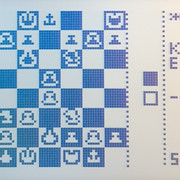
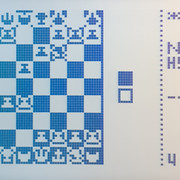
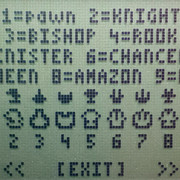
Added a chess game (experimental / for testing):
https://www-fourier.univ-grenoble-alpes.fr/~parisse/hpg1/chess.elf
To play a move, tap the touchscreen to select the piece you want to move, then tap a second time to select the target square.You can change the AI level by pressing keys 1, 3, 5, or 7 (note that higher levels can take significantly longer to compute; default is level 3, which takes a few seconds per move).You can save a game using the SIN or 9 key (S for Save), and load a saved game using COS or x² (L for Load).
I am not good enough at chess to evaluate the AI quality myself. I am using the Micro-Max AI engine—its PC version, running a 192 MB hashtable (2^24 entries), is rated around 1800–2000 Elo. The HP Prime G1 version uses a 2^17-entry hashtable and runs at level 3 by default. It is certainly lower, but it should still be quite decent...
@ parisse
Thank you for the chess program. I’m not very knowledgeable about chess, modern PCs, or the HP Prime calculator, yet I find it all very interesting. I’m more of a theorist than a practitioner. I had expected a bit more from the chess program for the HP Prime—at the very least, Fischer Random Chess, where the standard starting position is just one of 960 possibilities on an 8×8 board. As it stands, it differs little from a standard chess engine—like the one in the Casio PV-S660 (1998, NEC CPU at 20 MHz)—except that the calculation speed in Prime is twenty times faster. The Elo rating is roughly the same: 1600. The Chess program for CBASIC on the 9860GII plays at a similar level, with a move calculation time of approximately 60–100_s.


The TI-83+ allows you to create a feature-rich chess interface with decent speed, even using TI-BASIC. While a chess engine running in BASIC on the 83+ is extremely slow, it is possible to embed ASM code directly into the BASIC program.

Is it possible to load an .elf file into the HP Prime emulator app (Android) without using a PC? If so, please provide a link to the simplest method for doing this. For instance, Graph89.apk (for TI emulators) allows you to install Z80/68K programs and apps directly from the internet. With go49gp.apk, you have to use a file manager like X-plore. What options are available for HP Prime.apk?
The elf file is for the hardware Prime G1 only, it will not run on an emulator.
If you don't have a G1, I have just finished a port of the same engine to the Casio FXCG50/100, it can be run from inside KhiCAS, as a KhiCAS application (in the 3 files versions g3a launcher + 2 mzs files). It takes about 10 seconds at default level (3). The hashtable was reduce to 2^16 entries (RAM constraints).
  
Register to Join the Conversation
Have your own thoughts to add to this or any other topic? Want to ask a question, offer a suggestion, share your own programs and projects, upload a file to the file archives, get help with calculator and computer programming, or simply chat with like-minded coders and tech and calculator enthusiasts via the site-wide AJAX SAX widget? Registration for a free Cemetech account only takes a minute.

» Go to Registration page
Page 1 of 1
» All times are UTC - 5 Hours
 
You cannot post new topics in this forum
You cannot reply to topics in this forum
You cannot edit your posts in this forum
You cannot delete your posts in this forum
You cannot vote in polls in this forum


Advertisement