

Description
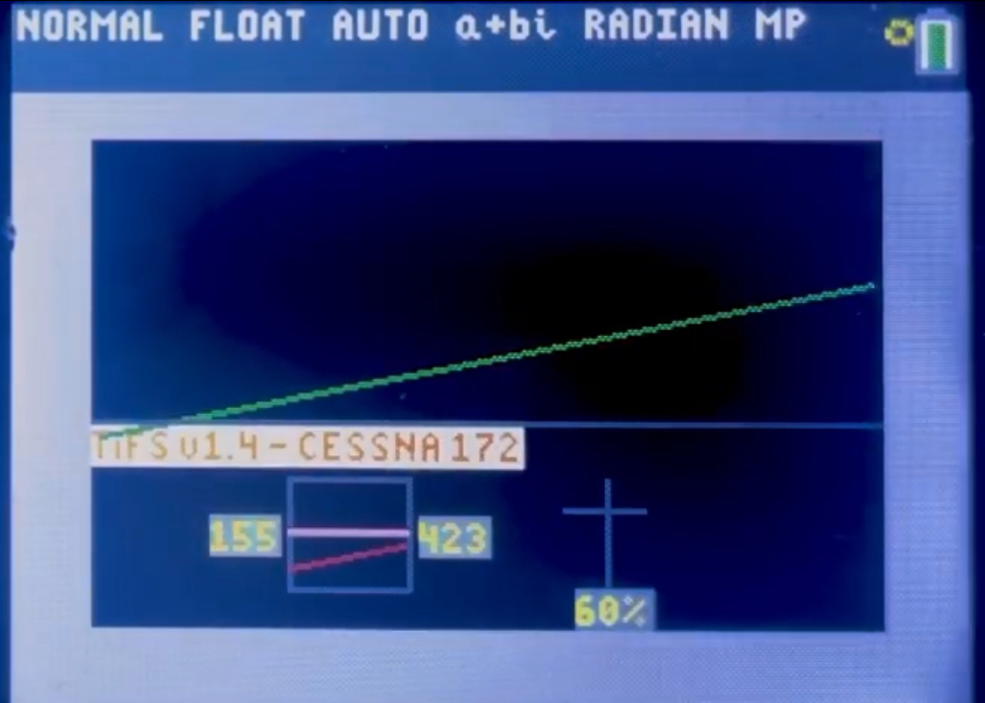
The Texas Instruments Flight Simulator, otherwise known by its acronym as the TiFS, is a Flight Simulator for the Ti-84 Plus CE. It is currently a work in progress. There are also no animations.
Before continuing, I strongly suggest checking out the itch.io page for the Texas Instruments Flight Simulator as opposed to the Cemetech page, since updates and news are easier and faster to ship on itch.io.
There are currently four planes I've made for the TiFS:
- Cessna 172 (released for the TiFS v1.0, on March 26, 2024)
- DHC-6 Twin Otter (released for the TiFS v1.1, on April 3, 2024)
- Beechcraft King Air 350 (released for the TiFS v1.2, on May 20, 2024)
- Piper PA-28 Arrow (released for the TiFS v1.5, on August 7, 2026)
The geometry for the planes is pretty rough and wireframe, but I'm not willing to fix it.
You cannot edit any plane files on the Ti-84 Plus CE alone, you can only do that through Ti Connect CE.
All the plane models are available for access on Desmos, in case you want to see how the planes were made, or you just want to help me add some planes to the TiFS.
Again, most of these features - they're a Work-In-Progress.
CONTROLS:
Use the Arrow Keys on the top right of the Calculator to pitch and roll the plane.
Use the MODE Key to yaw to the left, and the DEL key to yaw to the right.
Use the x,t,θ,n Key or the APPS Key to adjust the altimeter.
Use the STAT Key to increase throttle, and the PRGM Key to decrease throttle.
Use the F1 Key to toggle between views/cameras, such as the flight deck view and the external view.
Use the VAR Key to toggle the landing gear, only works on plane models with landing gear in real life, such as the Beechcraft King Air 350 and the Piper PA-28 Arrow.
Enjoy!
To start the Texas Instruments Flight Simulator, go to the PRGM page and run the file labelled TIFSV1. If you have downloaded the Day-Night Cycle add-on from the itch.io page of the Texas Instruments Flight Simulator, go to the PRGM page and run the file labelled TIFSDNC instead.
NEW CHANGE(S):
- A new plane has been added. That's it.
Screenshots


Archive Contents
| Name | Size |
|---|---|
| TiFS Version 1.5 - Cemetech Release/README - TiFS v1.5.txt | 945 bytes |
| TiFS Version 1.5 - Cemetech Release/TiFS Version 1.5/Plane Models/TiFS V1 - Beechcraft King Air.8xp | 7.1 KB |
| TiFS Version 1.5 - Cemetech Release/TiFS Version 1.5/Plane Models/TiFS V1 - C172.8xp | 6.3 KB |
| TiFS Version 1.5 - Cemetech Release/TiFS Version 1.5/Plane Models/TiFS V1 - Piper PA-28.8xp | 5.8 KB |
| TiFS Version 1.5 - Cemetech Release/TiFS Version 1.5/Plane Models/TiFS V1 - Twin Otter.8xp | 8.2 KB |
| TiFS Version 1.5 - Cemetech Release/TiFS Version 1.5/TIFSV1 - EndMenu.8xp | 199 bytes |
| TiFS Version 1.5 - Cemetech Release/TiFS Version 1.5/TIFSV1.8xp | 1.9 KB |
- File Size
- 13.1 KB
- Short link
- http://ceme.tech/DL2520
Metadata
- Author
- Aeroslate
- Uploaded
Links
- Desmos graph of plane models
- https://www.desmos.com/calculator/1z86d0zfoo
- Official itch.io page for TiFS
- https://aeroslate-technologies.itch.io/tifs-flightsim
Statistics
- Rating
- 7.7/10 (3 votes)
- Downloads
- 4843
- ↳ this version
- 179
- Views
- 12275
- ↳ this version
- 769
Reviews
can you make this in assembly or ice or smth other than basic please
The screen just blinks.
This is a very good program. I really like it. One thing you could fix is the menu. It could use a better selecter. Other then that it is good. Also the in the flight sim the screen kept refreshing/flashing every second.
I like the flight simulator but i don't know the controls, all i know is;
down arrow = plane goes up
up arrow = plane goes down
left arrow = plane tilts left
right arrow = plane tilts right
and the menu controls, idk how to move the camera to see the plane from the right or left
edit: i found out how to look from left to right, its;
mode = look left
del = look right
Versions
- TiFS v1.5 (published 2 months, 4 weeks ago; 2026-08-19 01:21 UTC)
- TiFS v1.5 (published 3 months, 1 week ago; 2026-08-08 16:54 UTC)
- TiFS v1.4 (published 1 year, 2 months ago; 2025-09-01 05:51 UTC)
- TiFS v1.4 (published 1 year, 2 months ago; 2025-08-26 05:43 UTC)
- TiFS v1.4 (published 1 year, 3 months ago; 2025-08-07 23:31 UTC)
- TiFS v1.3 (published 1 year, 3 months ago; 2025-08-05 03:09 UTC)
- TiFS v1.3 (published 1 year, 4 months ago; 2025-07-05 00:04 UTC)
- TiFS v1.3 (published 1 year, 5 months ago; 2025-05-18 00:49 UTC)
- TiFS v1.3 (published 1 year, 8 months ago; 2025-02-23 23:35 UTC)
- TiFS v1.3 (published 1 year, 8 months ago; 2025-02-20 00:11 UTC)
- TiFS v1.3 (published 1 year, 8 months ago; 2025-02-18 19:58 UTC)
- TiFS v1.2 (published 1 year, 9 months ago; 2025-02-04 05:49 UTC)
- TiFS v1.2 (published 2 years, 2 months ago; 2024-08-28 02:48 UTC)
Advertisement